SambaLab
Drum Player: The Real Brazilian Beats!
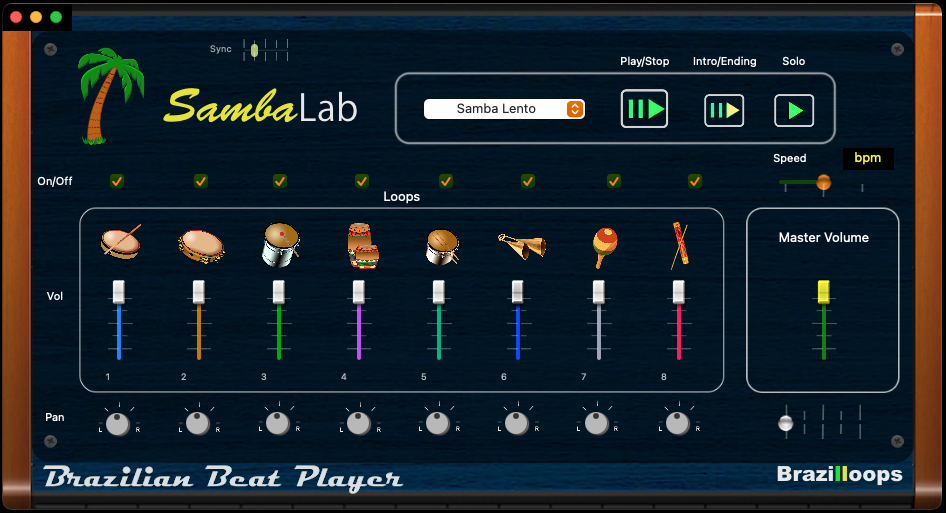
The Mac OSX Brazilian Drum Machine.
It’s a Mac application, an easy way to play 36 of our favorite beats from Brazilloops. It’s a sample player with 8 instrument tracks, each one with independent pan and volume. It plays the factory loops already downloaded inside the “machine”. It features an “intro” and “ending” playing and mute track function, all for live performance. Also you can change the speed in the bpm slider.
We find it a very handy application to play in the computer (Mac) for live performance or for studio recording. Note that it’s a sample (pre-recorded audio) player, we did so to keep the original Brazilian style and be able to give a human touch in the project. It’s a standalone application (not VST or AU).
Try the free version below:
Or get the full version for just 34.99
Features:
Main Window – It’s the view of the “machine” itself with all the tracks, volumes, menu, commands etc. where you play the loops. Like other audio plugins, the window size is fixed.
*Note that you can drag the window by clicking and holding it by the upper side only.
Menu – It displays all the beats in the machine. As for today we have 36 beats, we are currently working on more for future free updates.
Sync – First of all, depending in what computer you are using, you may need to adjust “sync” for better sample timing between tracks. This allow to have a precise synchronization depending how fast (newer or older) your CPU is.
Tracks – 1 to 8. Besides few exceptions, each track has it’s own instrument image for a general reference only. It does also have volume, pan (left-right) control and mute function.
Mute – Mute the track. Try it with several tracks to play one by one and put it together to discover very interesting useful beats!
Master Volume – It’s the main output volume that sends to the computer built-in or external interface output.
Play/Stop – It plays the main loop. Note that it’s a sample (pre-recorded audio) player, not a sequencer machine. We did so to keep the Brazilian swing style and be able to give a human touch in the project. So yes we have some limitations but still a great drum player.
Intro/Ending – Plays the intro, then the main loop. When you press it again it will play the ending after two or three measure. Note that to be able to play the ending phrase you will need to press the intro/ending button usually in the first measure of the loop. Try it few times to see how it works.
Solo – On/off, plays one instrument (track 1) .
Current Time Slider – It’s the moving slider when the loop is playing. The loops are two or sometimes four measures long.
Speed – Slider that changes the tempo in BPM ( beats per minute). The center means the original (factory) speed of the loop.
SambaLab
The Mac OSX Brazilian Drum Machine.